

 All 353 guides and tools, plus dungeons, bosses, beasts, items, addons and places on the World Map.
Quick access
 Talent CalculatorAll 9 classes, share a build by link
 Interactive World MapZones by level, dungeons and routes
 Leveling Guide 1–60Your route from any start to 60
 Dungeon FinderWhich dungeons fit your level
 Rotation TrainerPractice your rotation on a dummy
 Profession LevelingAny profession 1 to 300 with a shopping list

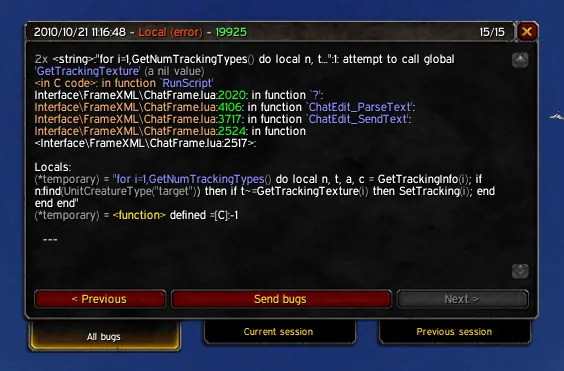
1/1The BugSack window showing one Lua error with its call stack and the tabs All bugs, Current session and Previous session with Previous, Send bugs and Next buttons
What it does
- Shows the Lua errors that BugGrabber caught in one window, with the full error text and call stack that you can copy and paste into a bug report
- Tabs for the current session, the previous session and all stored errors, Previous and Next buttons to step through them, and a Filter box to search the errors
- Can open itself when an error happens, but not during combat, print a short reminder in chat and play a sound, each of which you can switch off
- Adds a minimap icon and a data broker entry with the last 5 errors in its tooltip, click opens the last error and Shift-click reloads the interface
- The Options tab of the window has switches for auto popup, chat reminder, minimap icon, mute and the sound channel, a font size and sound choice, and a button that wipes all stored errors
In WoW Forever
Yes, BugSack has a WoW Forever version (version v12.1.8 of October 21).
Settings
/bugsack
Type /bugsack to open the window, then use its Options tab, or right-click the minimap icon to open the options.
Install
- Download the file tagged for Forever or game version 1.60.1.
- Unpack the folder into World of Warcraft\_classic_beta_\Interface\AddOns.
- Restart the game and check on the character screen under AddOns that it is on.
For the same job
FAQ
Does BugSack work in WoW Forever?
Yes, BugSack has a WoW Forever version (version v12.1.8 of October 21). We check the addon file itself, not only what the download page says.
Where do I download BugSack for WoW Forever?
On GitHub under Releases. Take the file tagged for Forever or game version 1.60.1. BugSack has 16.8M downloads on CurseForge.
How do I open the BugSack settings?
Type /bugsack in chat. Type /bugsack to open the window, then use its Options tab, or right-click the minimap icon to open the options.
Short on time? Let a booster play it
Every guide here shows how to do it yourself. If your evenings are short, our boosters take the grind off your hands. Options and current prices are on each service page.


Connected
Linked in other guides
Page history
What changed
Updated
The current Forever version is v12.1.8 of October 21.
New version with a Forever build: version and release date updated.
New page for this addon: what it does, its Forever status, settings, install steps, alternatives and the download from the developer or the project page, with the project's screenshots where it has them, each credited to its source.
First published Every change on the guides