

 All 353 guides and tools, plus dungeons, bosses, beasts, items, addons and places on the World Map.
Quick access
 Talent CalculatorAll 9 classes, share a build by link
 Interactive World MapZones by level, dungeons and routes
 Leveling Guide 1–60Your route from any start to 60
 Dungeon FinderWhich dungeons fit your level
 Rotation TrainerPractice your rotation on a dummy
 Profession LevelingAny profession 1 to 300 with a shopping list

1/6Animated look at centered Cooldown Manager icon rows with keybinds and a cast bar below them.
AnimationCaptured in RetailImages: curseforge.com
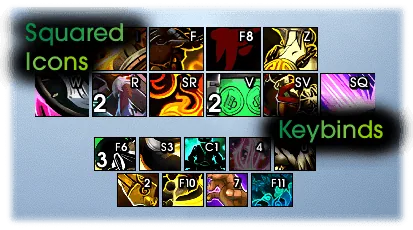
2/6Cooldown Manager icons as squares with a keybind letter in the corner of each icon.
Captured in RetailImages: curseforge.com
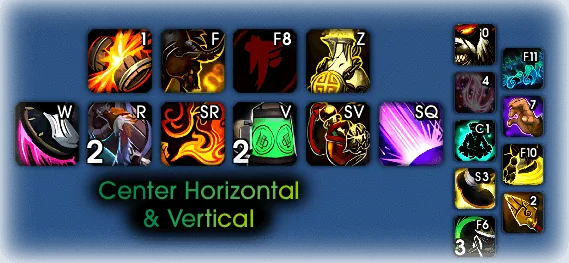
3/6Cooldown Manager rows centered horizontally and vertically, labeled Center Horizontal and Vertical.
Captured in RetailImages: curseforge.com
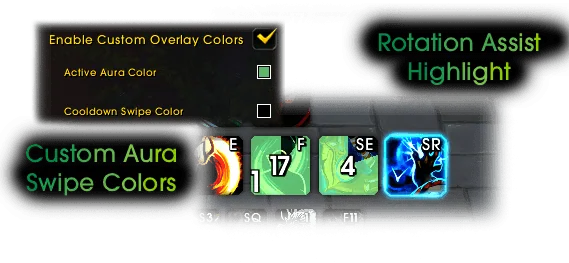
4/6The custom overlay color options with a green active aura color and a highlighted suggested ability.
Captured in RetailImages: curseforge.com
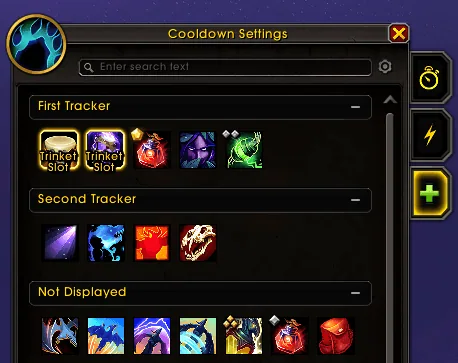
5/6The Cooldown Settings window with a First Tracker and Second Tracker that hold trinket slots and spells.
Captured in RetailImages: curseforge.com
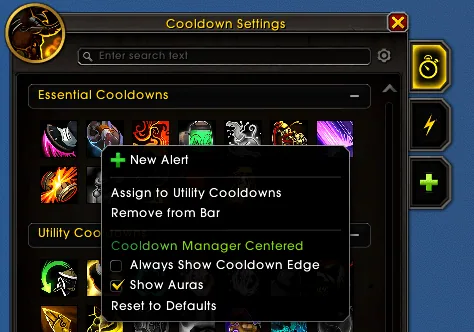
6/6Right-click menu on a Cooldown Manager icon with the addon's options: Always Show Cooldown Edge, Show Auras and Reset to Defaults.
Captured in RetailImages: curseforge.com
What it does
- Restyles the icons of the built-in Cooldown Manager with square icons and keybind text on each icon.
- Centers the Cooldown Manager rows horizontally and vertically, and shows in Edit Mode which side a frame grows from.
- Highlights the ability your rotation helper suggests and lets you recolor the swipe of active auras.
- Adds a custom tracker for consumables, trinkets, racials and any spell you pick.
- Per-ability options in the Cooldown Settings window, for example hiding the aura or always showing the cooldown edge.
In WoW Forever
Yes, Cooldown Manager Centered (CMC) has a WoW Forever version (version 5.9.0 of October 16).
Settings
/cmc
Type /cmc to open the addon's own settings, and /cds or /cdm to open the Cooldown Manager settings of the game.
Install
- Download the file tagged for Forever or game version 1.60.1.
- Unpack the folder into World of Warcraft\_classic_beta_\Interface\AddOns.
- Restart the game and check on the character screen under AddOns that it is on.
For the same job
- WeakAurasThe standard aura and trigger addon of Retail and Classic, with a huge import library.
- ForeverAurasA modified WeakAuras2 for Forever with the same layout of triggers and displays, still under development.
- M33kAurasWeakAuras fork with a Forever encounter catalog, downloaded by hand outside the addon apps.
- MiniAurasShows crowd control, defensive and important spell notifications.
- Musca AurasAnother WeakAuras-style addon for Forever under this name.
FAQ
Does Cooldown Manager Centered (CMC) work in WoW Forever?
Yes, Cooldown Manager Centered (CMC) has a WoW Forever version (version 5.9.0 of October 16). We check the addon file itself, not only what the download page says.
Where do I download Cooldown Manager Centered (CMC) for WoW Forever?
On CurseForge. Take the file tagged for Forever or game version 1.60.1. Cooldown Manager Centered (CMC) has 6.9M downloads on CurseForge.
How do I open the Cooldown Manager Centered (CMC) settings?
Type /cmc in chat. Type /cmc to open the addon's own settings, and /cds or /cdm to open the Cooldown Manager settings of the game.
Short on time? Let a booster play it
Every guide here shows how to do it yourself. If your evenings are short, our boosters take the grind off your hands. Options and current prices are on each service page.


Connected
Linked in other guides
Dungeons and raids1
Dungeons and raids1 Auras and cooldownsAddon category · Includes Cooldown Manager Centered - Better CDM
Page history
What changed
Updated
New version with a Forever build: version and release date updated.
New version with a Forever build: version and release date updated.
New page for this addon: what it does, its Forever status, settings, install steps, alternatives and the download from the developer or the project page, with the project's screenshots where it has them, each credited to its source.
First published Every change on the guides