

 All 353 guides and tools, plus dungeons, bosses, beasts, items, addons and places on the World Map.
Quick access
 Talent CalculatorAll 9 classes, share a build by link
 Interactive World MapZones by level, dungeons and routes
 Leveling Guide 1–60Your route from any start to 60
 Dungeon FinderWhich dungeons fit your level
 Rotation TrainerPractice your rotation on a dummy
 Profession LevelingAny profession 1 to 300 with a shopping list
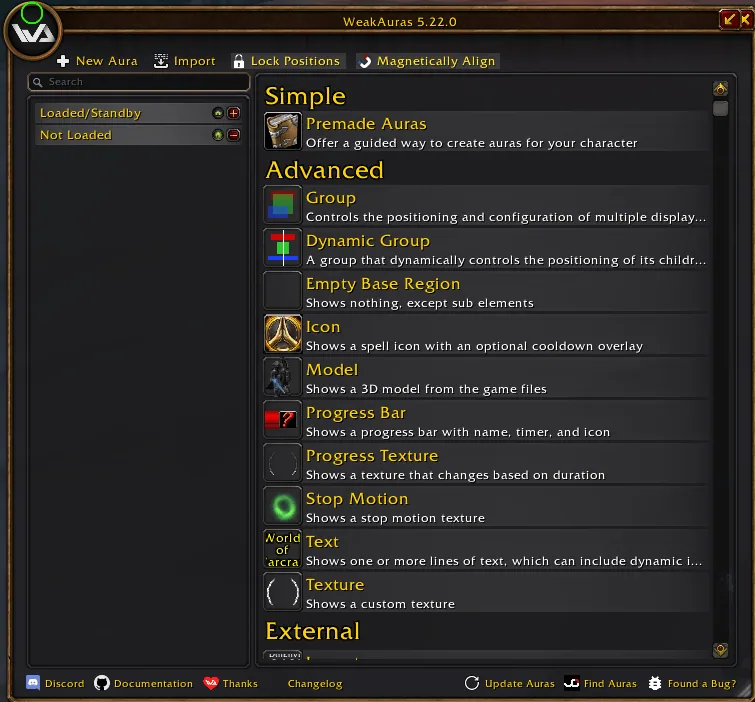
1/2The options window of Musca Auras, titled WeakAuras 5.22.0, with New Aura and Import buttons and a list of display types.
Captured in WoW ForeverImages: curseforge.com
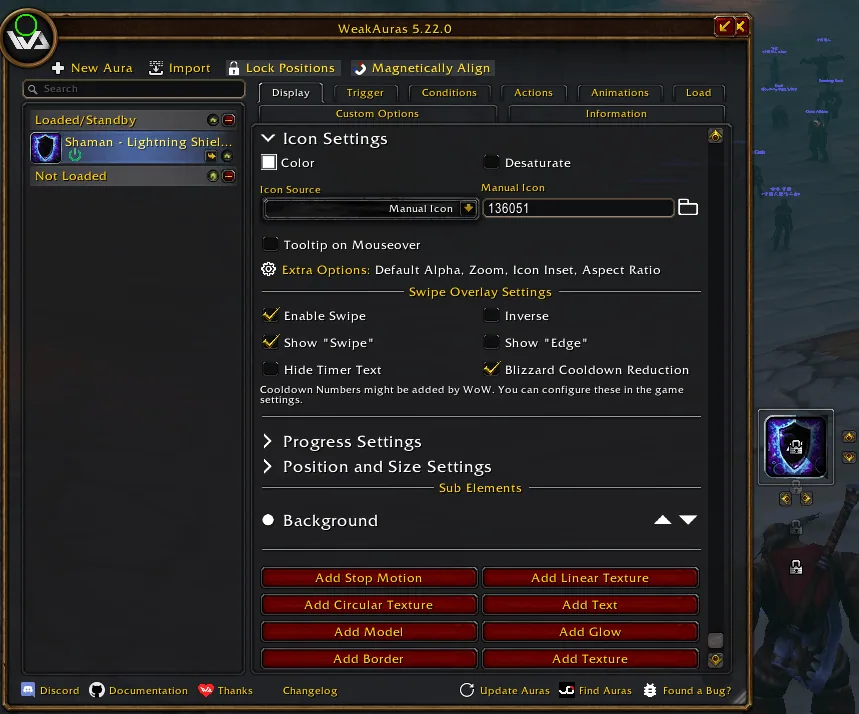
2/2The Display tab of a Lightning Shield icon aura with swipe settings, next to the game world with the aura icon on screen.
Captured in WoW ForeverImages: curseforge.com
What it does
- WeakAuras 5.22.0 ported to WoW Forever: /wa opens the same options window and your saved auras load as they are.
- Aura (Modern) trigger draws buffs and debuffs with the game's own aura widgets, so duration and stacks keep moving in combat, with a group to lay them out in rows or a grid, on unit frames or on nameplates.
- Blizzard Cooldown Manager trigger shows the cooldowns, buffs, debuffs and items of the game's Cooldown Manager, with swipe, bar and time text that keep running in combat.
- Health and Power triggers have a Show only below (%) option for low energy, mana or health alerts in combat.
- An in-game guide opens from the Guide button or with /wa tutorial, with recipes such as a DoT timer, one timer per mob and a boss timeline.
- Imports auras from Wago and from other WeakAuras builds, but triggers that read the combat log never fire.
In WoW Forever
Yes, Musca Auras (formerly WeakAuras Forever) has a WoW Forever version (version 1.14.0 of October 22).
Settings
/wa
Type /wa in chat, or click the minimap icon, to open the options window, and /wa tutorial for the in-game guide. When you update from 1.8.1 or older, restart the game, because a /reload does not load the new logo file. The Class Pack button at the top of the New Aura panel updates the auras of your class in place and keeps their position, size and options. Only a "<Class> (Musca)" group imported before 1.8.1 needs one swap: back it up and delete it before you import the class pack again, because the aura UIDs changed once. Your other auras stay. Since 1.12.0 your stance and form auras are converted when you log in, for the class you log in with: log in once with every class that has such auras, and do not go back to an older version afterwards, because that breaks the converted auras.
Install
- Download the file tagged for Forever or game version 1.60.1.
- Unpack the folder into World of Warcraft\_classic_beta_\Interface\AddOns.
- Restart the game and check on the character screen under AddOns that it is on.
For the same job
- WeakAurasThe standard aura and trigger addon of Retail and Classic, with a huge import library.
- ForeverAurasA modified WeakAuras2 for Forever with the same layout of triggers and displays, still under development.
- M33kAurasWeakAuras fork with a Forever encounter catalog, downloaded by hand outside the addon apps.
- Cooldown Manager Centered - Better CDMStyles the icons, buffs and bars of the Cooldown Manager.
- MiniAurasShows crowd control, defensive and important spell notifications.
FAQ
Does Musca Auras (formerly WeakAuras Forever) work in WoW Forever?
Yes, Musca Auras (formerly WeakAuras Forever) has a WoW Forever version (version 1.14.0 of October 22). We check the addon file itself, not only what the download page says.
Where do I download Musca Auras (formerly WeakAuras Forever) for WoW Forever?
On GitHub under Releases. Take the file tagged for Forever or game version 1.60.1. Musca Auras (formerly WeakAuras Forever) has 13.8K downloads on CurseForge.
How do I open the Musca Auras (formerly WeakAuras Forever) settings?
Type /wa in chat. Type /wa in chat, or click the minimap icon, to open the options window, and /wa tutorial for the in-game guide. When you update from 1.8.1 or older, restart the game, because a /reload does not load the new logo file. The Class Pack button at the top of the New Aura panel updates the auras of your class in place and keeps their position, size and options. Only a "<Class> (Musca)" group imported before 1.8.1 needs one swap: back it up and delete it before you import the class pack again, because the aura UIDs changed once. Your other auras stay. Since 1.12.0 your stance and form auras are converted when you log in, for the class you log in with: log in once with every class that has such auras, and do not go back to an older version afterwards, because that breaks the converted auras.
Short on time? Let a booster play it
Every guide here shows how to do it yourself. If your evenings are short, our boosters take the grind off your hands. Options and current prices are on each service page.


Connected
Linked in other guides
Dungeons and raids1
Dungeons and raids1 Auras and cooldownsAddon category · Includes Musca Auras
Page history
What changed
Updated
The current Forever version is 1.14.0 of October 22.
Version 1.12.0: it converts your stance and form auras when you log in, so log in once with every class that has them and do not go back to an older version.
Version 1.9.1: when you update from 1.8.1 or older, restart the game. Only a class group imported before 1.8.1 still needs the one-time swap.
First published Every change on the guides