
Quick access


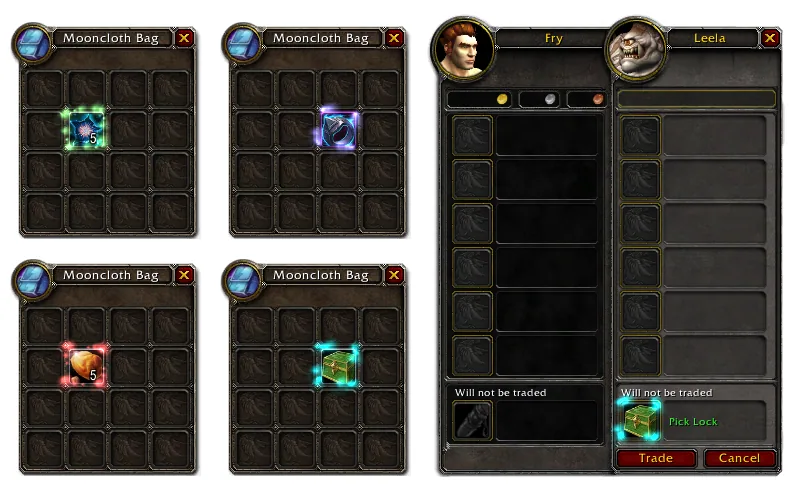
1/1Four bag windows with one highlighted item each that Molinari can act on, and a trade window where a lockbox shows the green Pick Lock text.
What it does
- Hold Alt and click an item in your bags to mill herbs, prospect ore or disenchant gear, with no profession window, macro or action bar slot.
- Picks locks the same way: click a lockbox with your lockpicking, or use a lockpick item made by a profession.
- Also works for picking locks in the trade window.
- In Forever it also handles the mage's Comprehension spell and feeding your pet from the bags.
- Shows a short help line in item tooltips so you see what the click will do.
In WoW Forever
Yes, Molinari has a WoW Forever version.
Settings
/molinari
Type /molinari to open the settings, where you can change the key you hold with the click (Alt, Alt+Ctrl or Alt+Shift).
Install
- Download the file tagged for Forever or game version 1.60.1.
- Unpack the folder into World of Warcraft\_classic_beta_\Interface\AddOns.
- Restart the game and check on the character screen under AddOns that it is on.
For the same job
- RareScannerAlerts you when a rare, event or treasure shows up on the minimap.
- SilverDragon - Rare ScannerScans for rare mobs so you can find them and their loot.
- Profession Shopping ListTracks recipes and reagents with cooldowns and shopping lists.
- GatheringShows per-hour collection rates for gathering professions.
- GatherLiteGathering helper that remembers where you found things.
- Profession MasterFinds guild crafters, cooldowns and specializations with shopping lists.
FAQ
Does Molinari work in WoW Forever?
Yes, Molinari has a WoW Forever version. We check the addon file itself, not only what the download page says.
Where do I download Molinari for WoW Forever?
On GitHub under Releases. Take the file tagged for Forever or game version 1.60.1. Molinari has 1.7M downloads on CurseForge.
How do I open the Molinari settings?
Type /molinari in chat. Type /molinari to open the settings, where you can change the key you hold with the click (Alt, Alt+Ctrl or Alt+Shift).
Short on time? Let a booster play it
Every guide here shows how to do it yourself. If your evenings are short, our boosters take the grind off your hands. Options and current prices are on each service page.


Connected
Linked in other guides
Professions and gold1
Professions and gold1
Page history
What changed
Updated
In the list for the same job, SilverDragon now has a Forever build.
New page for this addon: what it does, its Forever status, settings, install steps, alternatives and the download from the developer or the project page, with the project's screenshots where it has them, each credited to its source.
First published Every change on the guides