
Quick access


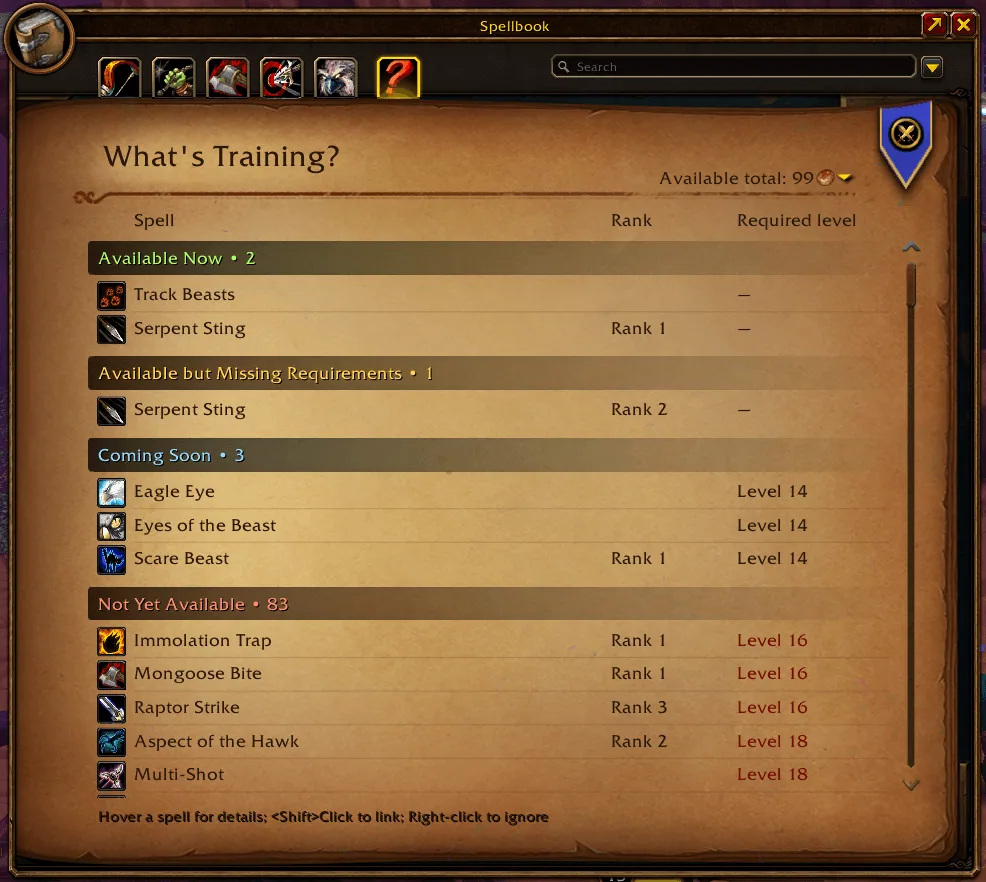
1/6The spellbook with the What's Training tab for a Hunter, listing spells under Available Now, Available but Missing Requirements, Coming Soon and Not Yet Available
Captured in WoW ForeverImages: curseforge.com
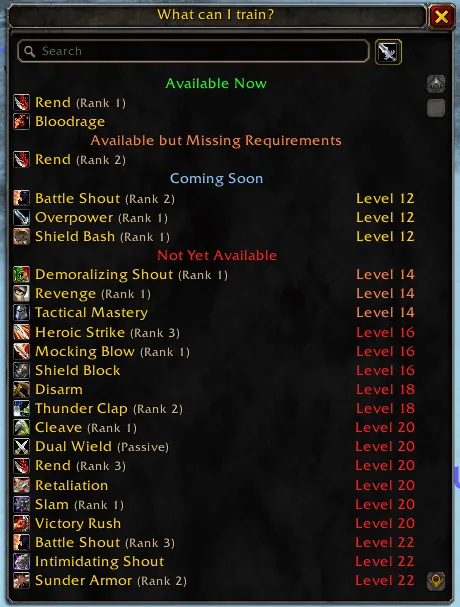
2/6The floating What can I train window opened with /wt, with a search box and warrior spells sorted by availability and required level
Captured in WoW ForeverImages: curseforge.com
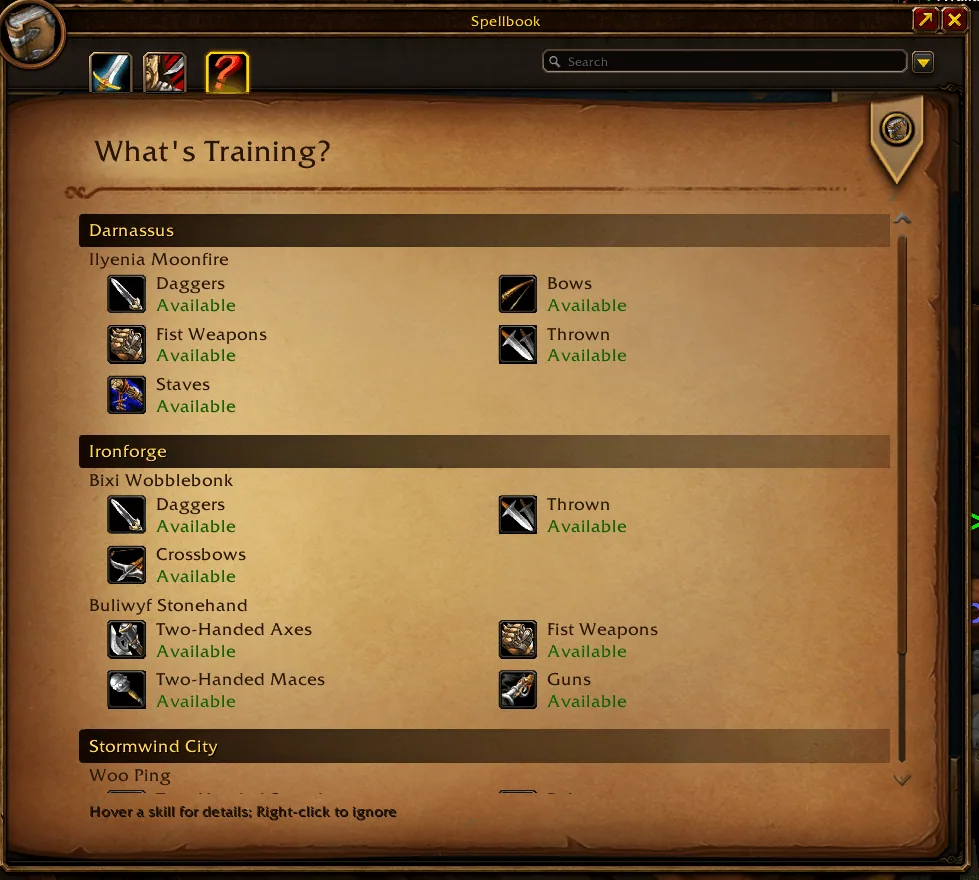
3/6The weapon skills page grouped by city, showing which weapon skills each trainer in Darnassus, Ironforge and Stormwind City can teach
Captured in WoW ForeverImages: curseforge.com
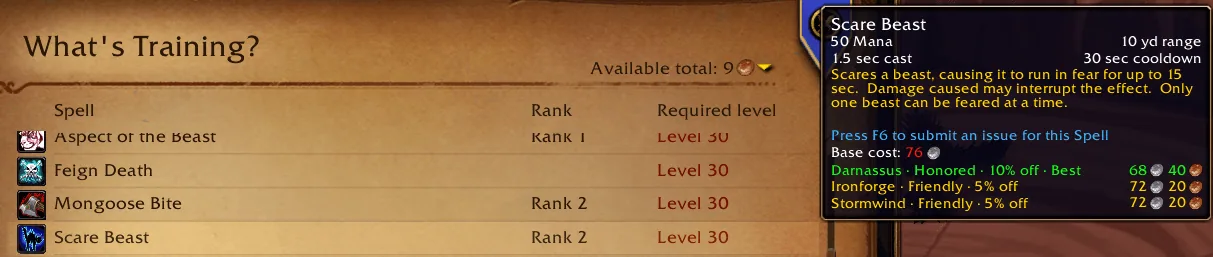
4/6A spell tooltip for Scare Beast with a price list by city, each line showing the reputation level, the discount and the cost, and the best price marked
Captured in WoW ForeverImages: curseforge.com
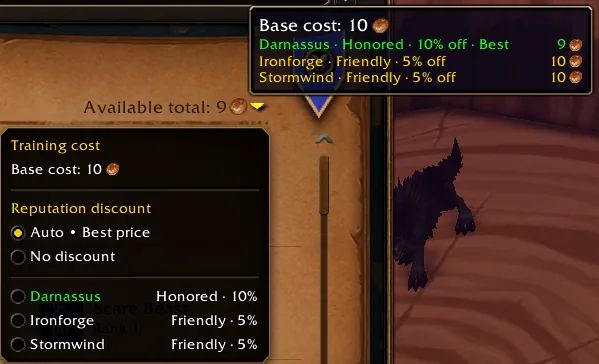
5/6The training cost menu with Auto best price, No discount and one entry per city, next to the available total in the page header
Captured in WoW ForeverImages: curseforge.com
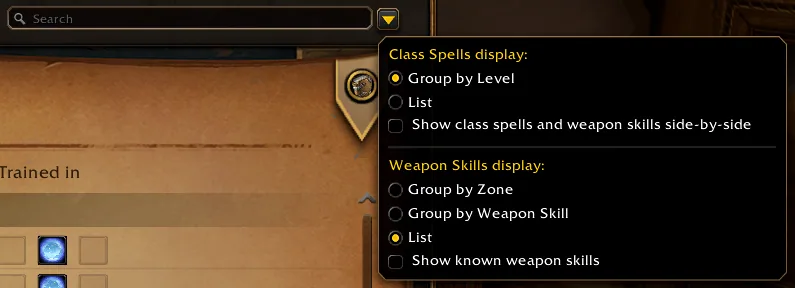
6/6The display options menu with class spell grouping by level or as a list and weapon skill grouping by zone, by weapon skill or as a list
Captured in WoW ForeverImages: curseforge.com
What it does
- Adds a What's Training tab to the spellbook that lists the spells your class trainer can teach, sorted into Available Now, Available but Missing Requirements, Coming Soon and Not Yet Available, with rank and required level.
- Hover a spell for its tooltip with the training cost. In Forever the price list shows the cost in each capital with your reputation discount and marks the best price.
- A weapon skills view shows which weapon skills you can still train, grouped by zone, by weapon or as a plain list.
- Search box, right-click to ignore a spell you do not want to see, and Shift-click to link a spell in chat.
- In Forever the command /wt opens a movable training window that also works with spellbook addons.
- A LibDataBroker display puts the list into bar addons such as Titan Panel or ChocolateBar.
In WoW Forever
Yes, What's Training? has a WoW Forever version (version 11.2.0 of November 5).
Settings
/wt
Type /wt to open the floating window. The display options sit behind the small arrow button next to the search box, for example grouping by level or as a list, grouping weapon skills, and the price and reputation discount choice.
Install
- Download the file tagged for Forever or game version 1.60.1.
- Unpack the folder into World of Warcraft\_classic_beta_\Interface\AddOns.
- Restart the game and check on the character screen under AddOns that it is on.
For the same job
- RestedXP GuideSpeedrunner-made leveling guides that route quests, travel and dungeon runs.
- GuidelimeLeveling guide addon with automatic progress tracking and a guide editor, open source.
- TUGs Leveling Guidelime GuideRoute pack for Guidelime covering several Classic versions and professions.
- Zygor GuidesPaid in-game leveling and gold guides with waypoint arrows, sold as a subscription.
- GearQuest - ForeverLeveling companion that points out the best gear upgrades by slot, class and level.
- ForeverJourneyXPConfigurable XP bar for leveling with previews of quest and rested XP and session statistics. Settings open with /fjxp.
FAQ
Does What's Training? work in WoW Forever?
Yes, What's Training? has a WoW Forever version (version 11.2.0 of November 5). We check the addon file itself, not only what the download page says.
Where do I download What's Training? for WoW Forever?
On GitHub under Releases. Take the file tagged for Forever or game version 1.60.1. What's Training? has 9M downloads on CurseForge.
How do I open the What's Training? settings?
Type /wt in chat. Type /wt to open the floating window. The display options sit behind the small arrow button next to the search box, for example grouping by level or as a list, grouping weapon skills, and the price and reputation discount choice.
Short on time? Let a booster play it
Every guide here shows how to do it yourself. If your evenings are short, our boosters take the grind off your hands. Options and current prices are on each service page.


Connected
Linked in other guides
More guides2
More guides2
- LevelingActivity · Useful addons What's Training?
- ProfessionsActivity · Useful addons What's Training?
Page history
What changed
Updated
The current Forever version is 11.2.0 of November 5.
The current Forever version is 11.1.0 of November 5.
The current Forever version is the beta 11.0.0-beta29 of November 3.
First published Every change on the guides