
Quick access


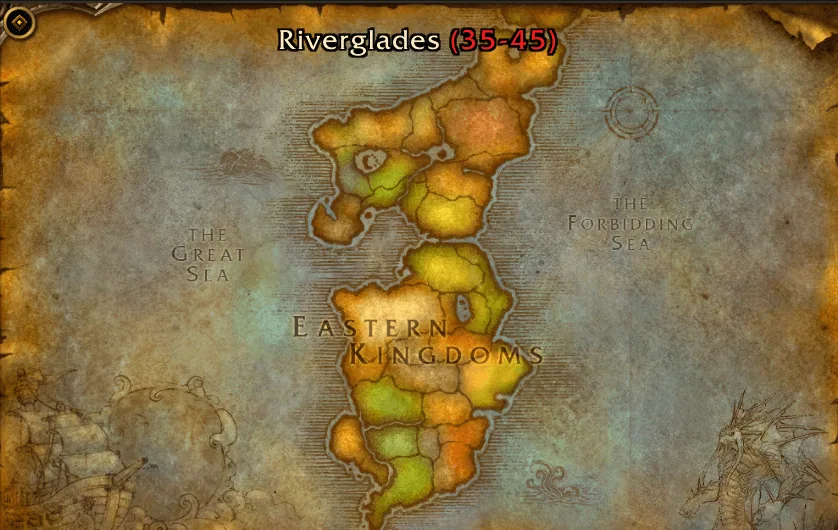
1/5The World Map with the zone name Riverglades and its level range 35–45 in red above the Eastern Kingdoms.
Captured in WoW ForeverImages: curseforge.com
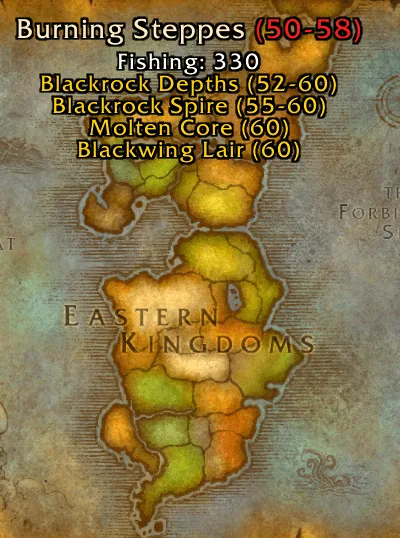
2/5Map tooltip for Burning Steppes with level 50–58, fishing skill 330 and a list of Blackrock Depths, Blackrock Spire, Molten Core and Blackwing Lair with their levels.
Captured in WoW ForeverImages: curseforge.com
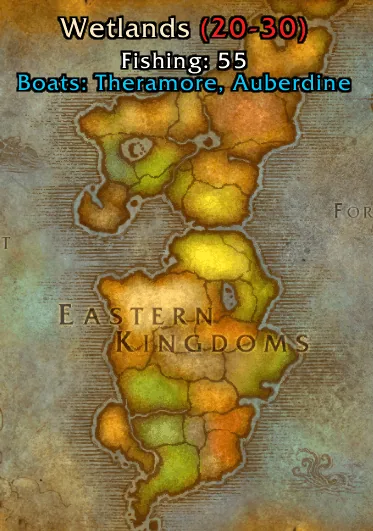
3/5Map tooltip for Wetlands with level 20–30, fishing skill 55 and a blue line listing the boats to Theramore and Auberdine.
Captured in WoW ForeverImages: curseforge.com
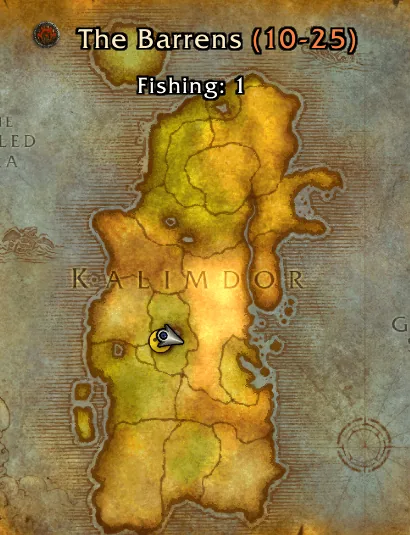
4/5Map tooltip for The Barrens with level 10–25, fishing skill 1 and a faction shield icon next to the zone name.
Captured in WoW ForeverImages: curseforge.com
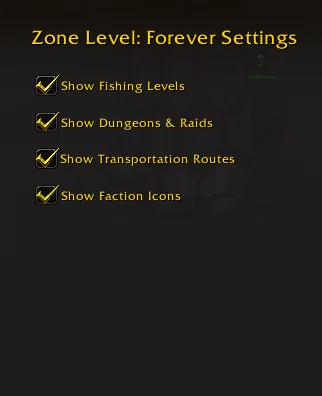
5/5The addon's settings window with four checkboxes: fishing levels, dungeons and raids, transportation routes and faction icons.
Captured in WoW ForeverImages: curseforge.com
What it does
- Adds the zone's level range to the World Map tooltip, colored by how hard the zone is for your character.
- Lists the dungeons and raids that sit in the hovered zone, each with its level range, including the new Forever instances.
- Shows the fishing skill you need to fish in that zone.
- Shows a small faction icon for zones held by the Alliance, the Horde or contested.
- Can list boat and other transport routes from the zone, and herb and mining nodes found there (herbs and mining are off by default).
- Every line can be switched on or off in the settings, and dungeon and node names follow your client language.
In WoW Forever
Yes, Zone Info: Forever has a WoW Forever version (version 1.9.2 of November 4).
Settings
/zif
Type /zif to open the settings, or find them under Esc, Options, AddOns.
Install
- Download the file tagged for Forever or game version 1.60.1.
- Unpack the folder into World of Warcraft\_classic_beta_\Interface\AddOns.
- Restart the game and check on the character screen under AddOns that it is on.
For the same job
- TomTomWaypoint arrow and coordinates for any map spot, the addon behind most "point me there" features.
- Leatrix MapsMap enhancements from Leatrix that support every WoW version.
- Forever World Map RevealFixes missing Forever beta world map textures on clients that are not English.
- MapsterWorld map enhancement addon by Nevcairiel.
- Waypoint UIIn-world waypoint display that shows relevant information in space.
- OpenMapOne seamless world map with every zone stitched together, so you zoom out of one zone and pan straight into the next. Blizzard's map, the quest log and Questie keep working. Still a beta. Opens with /openmap.
FAQ
Does Zone Info: Forever work in WoW Forever?
Yes, Zone Info: Forever has a WoW Forever version (version 1.9.2 of November 4). We check the addon file itself, not only what the download page says.
Where do I download Zone Info: Forever for WoW Forever?
On CurseForge. Take the file tagged for Forever or game version 1.60.1. Zone Info: Forever has 18.6K downloads on CurseForge.
How do I open the Zone Info: Forever settings?
Type /zif in chat. Type /zif to open the settings, or find them under Esc, Options, AddOns.
Short on time? Let a booster play it
Every guide here shows how to do it yourself. If your evenings are short, our boosters take the grind off your hands. Options and current prices are on each service page.


Connected
Linked in other guides
Leveling Guide 1–601
Leveling Guide 1–601- LevelingActivity · Useful addons Zone Info: Forever
Page history
What changed
Updated
The current Forever version is 1.9.2 of November 4.
New version with a Forever build: version and release date updated.
New version with a Forever build: version and release date updated.
First published Every change on the guides