
Quick access


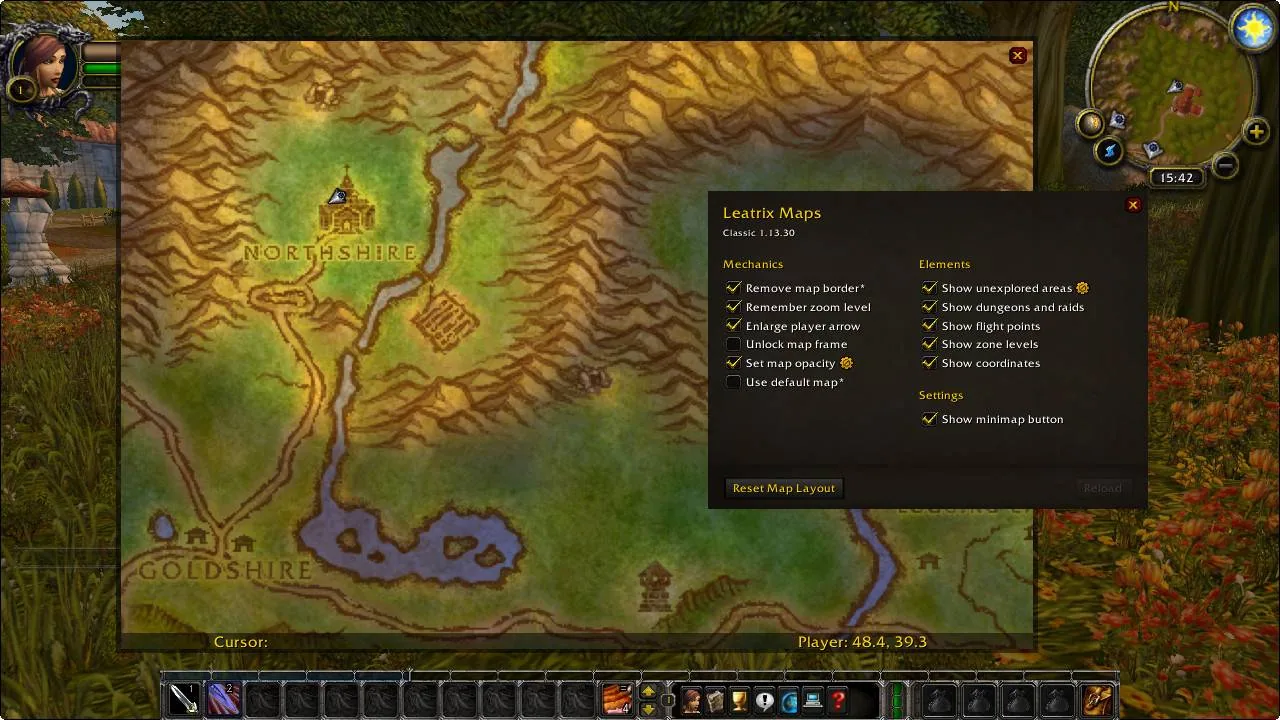
1/1The Leatrix Maps settings window over the world map of Northshire, with checkboxes for mechanics and map elements and a Reset Map Layout button.
Captured in ClassicImages: curseforge.com
What it does
- Shows unexplored areas on the world map, with an option to tint them so you still see what you have not visited.
- Shows points of interest: dungeons and raids, flight points, boats, zeppelins and trams, portals, spirit healers and zone crossings, with a switch for the opposing faction.
- Shows zone levels on the continent maps, and minimum fishing skill levels as an option.
- Shows your coordinates and the cursor coordinates on the map.
- Lets you move and scale the map, switch to a simple compact map frame, hide the border or the blackout frame and stop the map fading while you move.
- Enhances the battlefield map and can remember the zoom level. Every setting is optional and the addon only does what you switch on.
In WoW Forever
Yes, Leatrix Maps has a WoW Forever version (version 1.60.28 of November 6).
Settings
/ltm
Type /ltm (or /leamaps) to open Leatrix Maps, or click the minimap button. You can also bind a key to it in the game keybindings.
Install
- Download the file tagged for Forever or game version 1.60.1.
- Unpack the folder into World of Warcraft\_classic_beta_\Interface\AddOns.
- Restart the game and check on the character screen under AddOns that it is on.
For the same job
- TomTomWaypoint arrow and coordinates for any map spot, the addon behind most "point me there" features.
- Forever World Map RevealFixes missing Forever beta world map textures on clients that are not English.
- MapsterWorld map enhancement addon by Nevcairiel.
- Waypoint UIIn-world waypoint display that shows relevant information in space.
- OpenMapOne seamless world map with every zone stitched together, so you zoom out of one zone and pan straight into the next. Blizzard's map, the quest log and Questie keep working. Still a beta. Opens with /openmap.
- Zone Info: ForeverAdds the zone level range and the dungeons and raids in it to the World Map tooltip, renamed from Zone Level Forever.
FAQ
Does Leatrix Maps work in WoW Forever?
Yes, Leatrix Maps has a WoW Forever version (version 1.60.28 of November 6). We check the addon file itself, not only what the download page says.
Where do I download Leatrix Maps for WoW Forever?
On CurseForge. Take the file tagged for Forever or game version 1.60.1. Leatrix Maps has 40.3M downloads on CurseForge.
How do I open the Leatrix Maps settings?
Type /ltm in chat. Type /ltm (or /leamaps) to open Leatrix Maps, or click the minimap button. You can also bind a key to it in the game keybindings.
Short on time? Let a booster play it
Every guide here shows how to do it yourself. If your evenings are short, our boosters take the grind off your hands. Options and current prices are on each service page.


Connected
Linked in other guides
More guides4
More guides4

- LevelingActivity · Useful addons Leatrix Maps
Page history
What changed
Updated
The current Forever version is 1.60.28 of November 6.
The current Forever version is 1.60.27 of November 5.
The current Forever version is 1.60.25 of October 21.
First published Every change on the guides