
Quick access


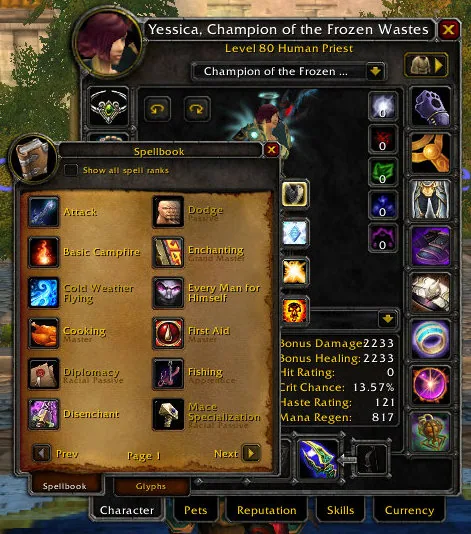
1/1The spellbook window dragged on top of the character window, both with their default look.
Captured in ClassicImages: curseforge.com
What it does
- Makes the default Blizzard windows movable: click the title bar and drag the window where you want it.
- Ctrl and mouse wheel over a title changes the window scale. Shift and right-click resets the position, Ctrl and right-click resets the scale.
- Remembers positions and scales the way you choose: not at all, until you reload the UI, or permanently.
- Alt and drag pulls a child window (for example a calendar event window) off its parent, Alt and right-click puts it back.
- The settings list every supported frame with a search box, so you can switch single frames off, and an option can require Shift to be held before anything moves.
In WoW Forever
Yes, BlizzMove has a WoW Forever version (version v3.8.7 of November 5).
Partly built into the game already: Edit Mode.
Settings
/bm
Type /bm (or /blizzmove) to open the options, which also list every supported frame.
Install
- Download the file tagged for Forever or game version 1.60.1.
- Unpack the folder into World of Warcraft\_classic_beta_\Interface\AddOns.
- Restart the game and check on the character screen under AddOns that it is on.
For the same job
- Leatrix PlusModular quality-of-life addon with automation, chat, interface and social options.
- MoveAnyMove any Blizzard UI element or window.
- AdvancedInterfaceOptionsRestores access to interface options that Blizzard removed.
- Enhance QoLBundle of small interface tweaks such as a drink macro and quick LFG signup.
- EllesmereUI: Standalone Forever EssentialsStandalone quality-of-life pack for Forever with flight timers and a threat meter, no full UI needed.
- Forever AIOOptional modules in one addon: gear comparison, dungeon loot, hunter pet info and a planner for your trainer visits. Its author still calls it a beta.
FAQ
Does BlizzMove work in WoW Forever?
Yes, BlizzMove has a WoW Forever version (version v3.8.7 of November 5). We check the addon file itself, not only what the download page says.
Where do I download BlizzMove for WoW Forever?
On GitHub under Releases. Take the file tagged for Forever or game version 1.60.1. BlizzMove has 12.1M downloads on CurseForge.
How do I open the BlizzMove settings?
Type /bm in chat. Type /bm (or /blizzmove) to open the options, which also list every supported frame.
Short on time? Let a booster play it
Every guide here shows how to do it yourself. If your evenings are short, our boosters take the grind off your hands. Options and current prices are on each service page.


Connected
Linked in other guides

Page history
What changed
Updated
The current Forever version is v3.8.7 of November 5.
The current Forever version is v3.8.6 of November 4.
New version with a Forever build: version and release date updated.
First published Every change on the guides