
Quick access


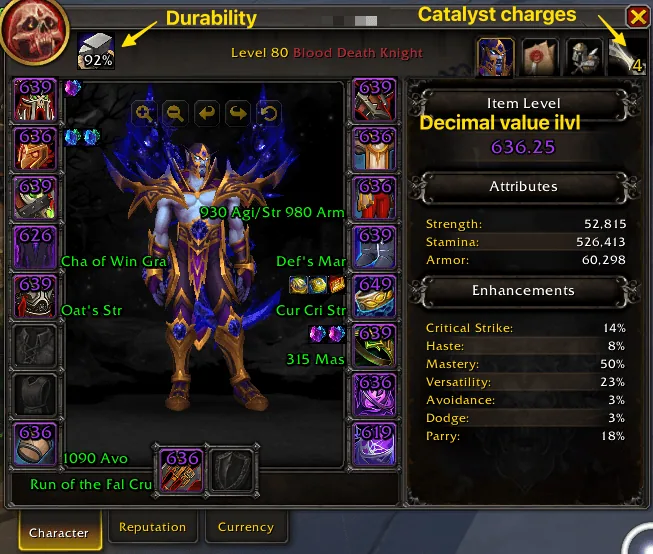
1/3The character window with item level, gems, enchants and durability shown on the gear, and the item level with decimals.
Captured in RetailImages: curseforge.com
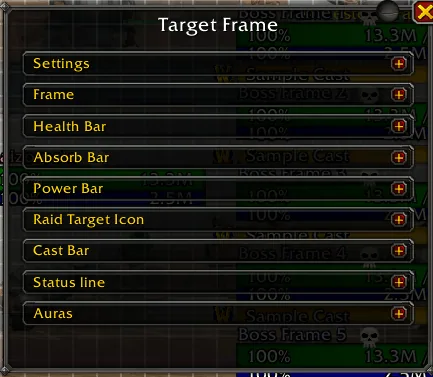
2/3The Target Frame settings of the custom unit frames with sections for frame, health bar, absorb bar, power bar, cast bar and auras.
Captured in RetailImages: curseforge.com
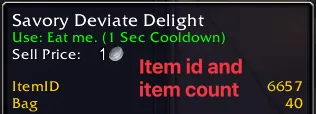
3/3A food item tooltip with the item ID and the item count in the bag added below the sell price.
Captured in RetailImages: curseforge.com
What it does
- Spell rank upgrades: puts the highest rank you know on your action bars at login, after loading screens and when you learn a new rank, with an ignore list for single ranks.
- Food and drink macro: keeps a macro filled with food and drinks from your bags that fit your level, also for classes without mana, with a minimum mana percent for drinks.
- Mana regeneration marker: a moving marker on the mana bar for the 5 seconds after a cast, then estimated 2-second regeneration ticks.
- Pet food indicator for hunters: marks bag items your current pet can eat while the pet is out.
- Custom unit, party, raid and boss frames, resource bars and cooldown panels, set up with Edit Mode.
- Many smaller tweaks: custom bags and bank, a whisper mini window (Instant Messenger), item and spell IDs in tooltips, a mover for Blizzard frames, damage meter windows, a cursor ring and trail.
In WoW Forever
Yes, Enhance QoL has a WoW Forever version (version 13.17.4 of November 5).
Settings
/eqol
Type /eqol to open the settings. /eim toggles the Instant Messenger and /eqol resetframe re-centers all Enhance QoL windows.
Install
- Download the file tagged for Forever or game version 1.60.1.
- Unpack the folder into World of Warcraft\_classic_beta_\Interface\AddOns.
- Restart the game and check on the character screen under AddOns that it is on.
For the same job
- Leatrix PlusModular quality-of-life addon with automation, chat, interface and social options.
- BlizzMoveMakes the default frames movable with drag and drop.
- MoveAnyMove any Blizzard UI element or window.
- AdvancedInterfaceOptionsRestores access to interface options that Blizzard removed.
- EllesmereUI: Standalone Forever EssentialsStandalone quality-of-life pack for Forever with flight timers and a threat meter, no full UI needed.
- Forever AIOOptional modules in one addon: gear comparison, dungeon loot, hunter pet info and a planner for your trainer visits. Its author still calls it a beta.
FAQ
Does Enhance QoL work in WoW Forever?
Yes, Enhance QoL has a WoW Forever version (version 13.17.4 of November 5). We check the addon file itself, not only what the download page says.
Where do I download Enhance QoL for WoW Forever?
On CurseForge. Take the file tagged for Forever or game version 1.60.1. Enhance QoL has 7.3M downloads on CurseForge.
How do I open the Enhance QoL settings?
Type /eqol in chat. Type /eqol to open the settings. /eim toggles the Instant Messenger and /eqol resetframe re-centers all Enhance QoL windows.
Short on time? Let a booster play it
Every guide here shows how to do it yourself. If your evenings are short, our boosters take the grind off your hands. Options and current prices are on each service page.


Connected
Linked in other guides
Page history
What changed
Updated
The current Forever version is 13.17.4 of November 5.
The current Forever version is 13.17.1 of November 5.
The current Forever version is 13.16.2 of October 31.
First published Every change on the guides