
Quick access


EllesmereUI for WoW Forever
Yes, EllesmereUI has a WoW Forever version (version 9.7.8 of November 6). UI suite with an unlock-mode editor, action bars, unit and raid frames, nameplates, a cooldown manager skin, chat, bags and a base layout made for Forever.
- Downloads
- 7M
- Version
- 9.7.8
- checked
- Sep 28
1/6Video: Unlock Mode, frames shown as boxes and dragged into place
VideoCaptured in RetailImages: ellesmereui.com
2/6Video: raid frame settings with a live preview of the group frames
VideoCaptured in RetailImages: ellesmereui.com
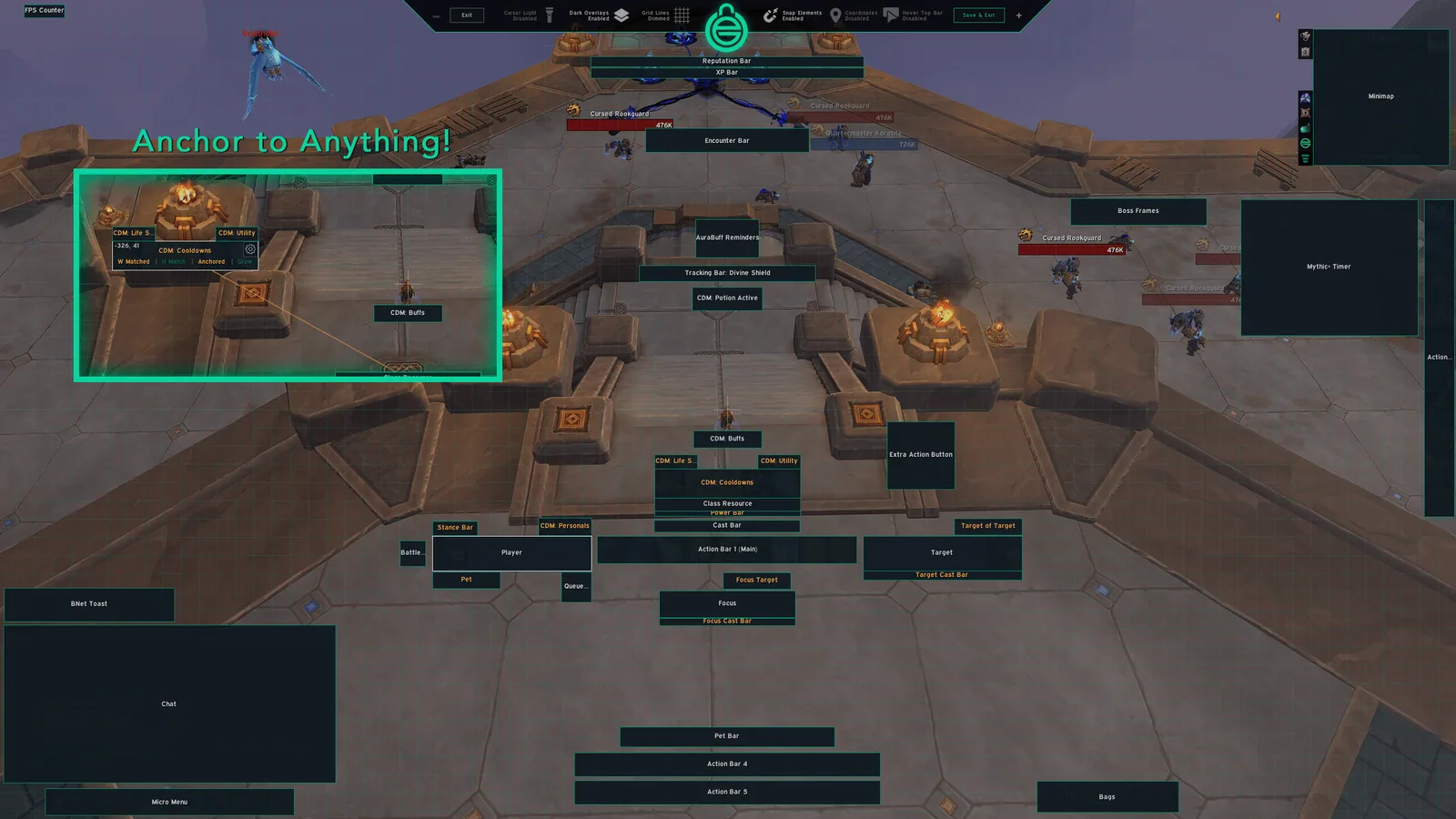
3/6Unlock Mode with a frame anchored to another frame
Captured in RetailImages: curseforge.com
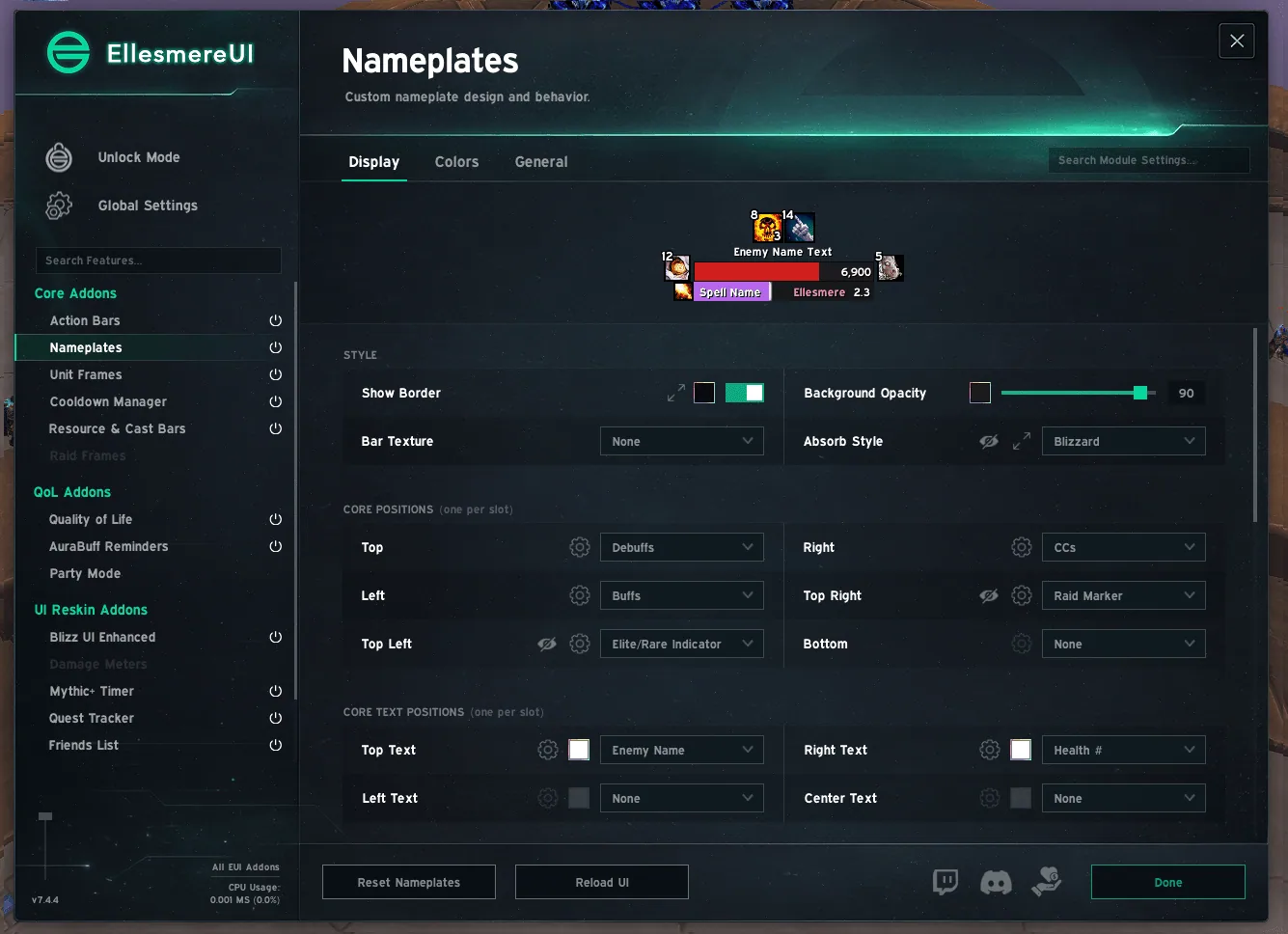
4/6EllesmereUI settings window on the nameplate page
Captured in RetailImages: curseforge.com
5/6Reskinned character sheet and friends list next to the action bars
Captured in RetailImages: curseforge.com
6/6Minimap, quest tracker and chat in the EllesmereUI style
Captured in RetailImages: curseforge.com
What it does
- Replaces action bars, unit frames, nameplates, raid frames, chat, minimap and bags with one matching set of modules you switch on one by one.
- Unlock Mode lets you drag any frame, snap it to other frames and match its width and height.
- A WoW Forever style copies the Forever default look, with gryphon or wyvern art on the action bar, the day and night orb on the minimap and round level badges.
- The Forever Essentials module adds a threat meter, a flight timer, a loot feed and a spell rank helper.
- Reskins Blizzard windows such as the character sheet, friends list and group finder to the same look.
- Community presets on the website can be imported as a starting layout.
In WoW Forever
Yes, EllesmereUI has a WoW Forever version (version 9.7.8 of November 6).
Settings
/eui
Type /eui (also /ellesmere or /ellesmereui) to open the settings window. /unlock starts Unlock Mode for moving frames. On first start the addon asks which modules you want.
Install
- Download the file tagged for Forever or game version 1.60.1.
- Unpack the folder into World of Warcraft\_classic_beta_\Interface\AddOns.
- Restart the game and check on the character screen under AddOns that it is on.
For the same job
- ElvUIFull interface replacement with unit frames, bars, bags, chat and nameplates, downloaded from Tukui instead of the usual addon apps.
- ForeverUIRole-adaptive interface for Forever with healer, tank and DPS frames, click casting, action bars, nameplates, bags, chat and a quest helper module.
- SpartanUILong-running UI suite combining artwork with unit frames, bars and minimap options.
- LuckyoneUIElvUI-based interface that also runs standalone, with a bundled damage meter.
- OakUI: The Ellesmere UI EditionOne-click profile installer with layouts for EllesmereUI.
- MelloUIAll-in-one Forever interface with an old-school RPG reskin, voiced quest givers, a route arrow and an updated map.
FAQ
Does EllesmereUI work in WoW Forever?
Yes, EllesmereUI has a WoW Forever version (version 9.7.8 of November 6). We check the addon file itself, not only what the download page says.
Where do I download EllesmereUI for WoW Forever?
On the developer's site. Take the file tagged for Forever or game version 1.60.1. EllesmereUI has 7M downloads on CurseForge.
How do I open the EllesmereUI settings?
Type /eui in chat. Type /eui (also /ellesmere or /ellesmereui) to open the settings window. /unlock starts Unlock Mode for moving frames. On first start the addon asks which modules you want.
Short on time? Let a booster play it
Every guide here shows how to do it yourself. If your evenings are short, our boosters take the grind off your hands. Options and current prices are on each service page.


Connected
Linked in other guides
More guides7
More guides7


Page history
What changed
Updated
The current Forever version is 9.7.8 of November 6.
The current Forever version is 9.7.6 of November 5.
The current Forever version is 9.7.3 of November 2.
First published Every change on the guides